
Public
My First Week with Pi-hole: Blocking Over 30% of Internet Noise
Protecting Every Device on My Network with One Raspberry Pi
After running Pi-hole on my Raspberry Pi NAS for a week, I'm honestly surprised by what I found. If you're not familiar with Pi-hole, it's a network-wide ad blocker that runs on a Raspberry Pi. Instead of installing ad blockers on every device, Pi-hole filters ads and trackers at the DNS level for your entire network.
## The Stats Don't Lie
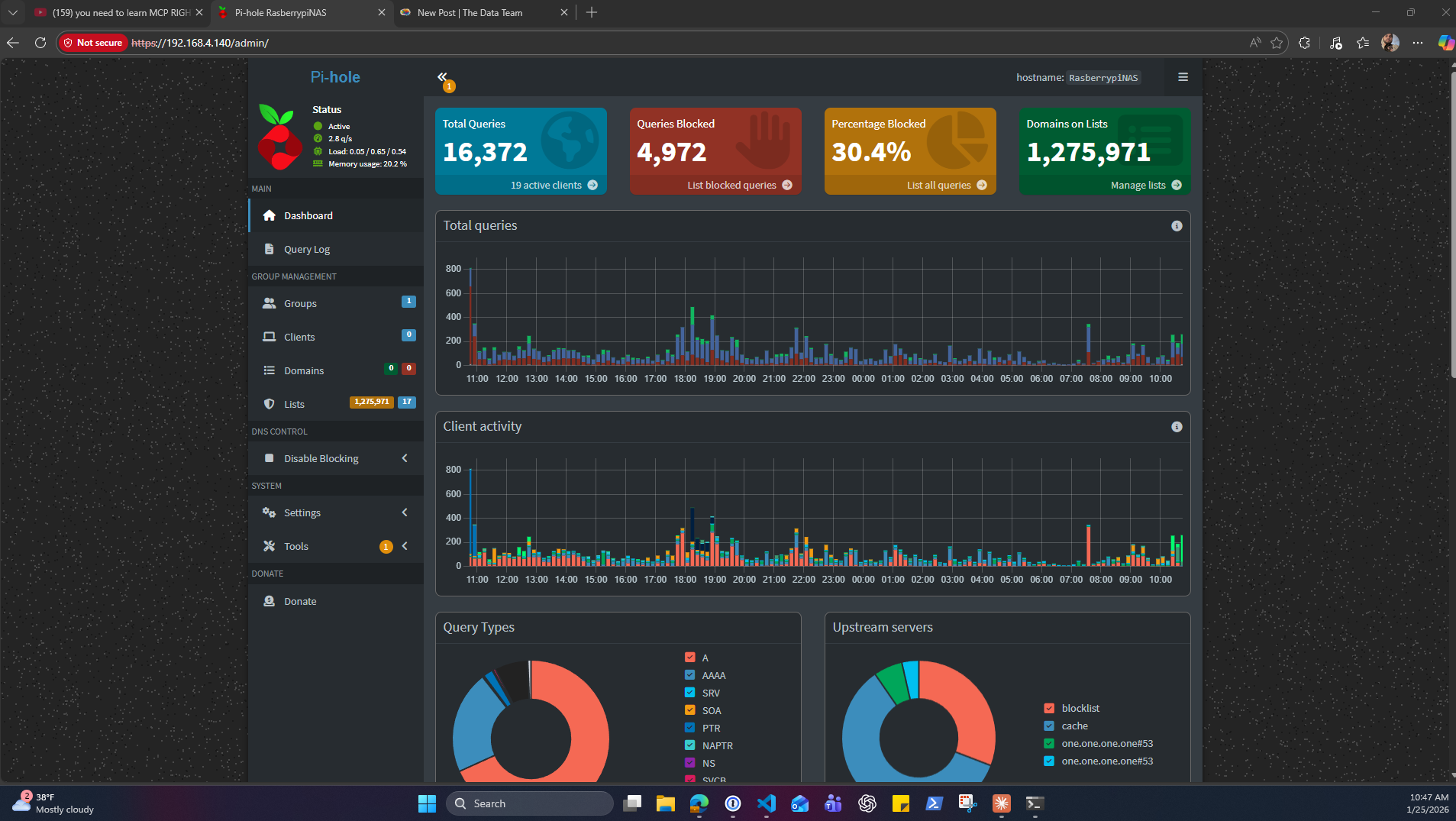
In just one week, here's what Pi-hole blocked on my home network:
- **Total queries processed:** 16,372
- **Queries blocked:** 4,972
- **Percentage blocked:** 30.4%
That means nearly one-third of all DNS requests on my network were ads, trackers, or unwanted content. I had no idea how much background noise was happening on my devices until I saw these numbers.
## What This Actually Means
When you browse the web, your devices are constantly making requests—not just for the content you want to see, but for ads, analytics trackers, and all sorts of third-party scripts. Pi-hole sits between your network and the internet, checking every request against blocklists of known ad and tracking domains.
If a request matches something on the blocklist, Pi-hole simply doesn't let it through. The result? Cleaner browsing, faster page loads, and better privacy across every device on your network—phones, tablets, smart TVs, even IoT devices you can't install ad blockers on.
## The Setup Experience
I won't sugarcoat it—getting Pi-hole running had its challenges. Setting up the static IP configuration took some troubleshooting (turns out I had myself on the wrong network subnet at one point), but once it was configured properly, it's been rock solid.
The web interface is incredibly clean and informative. I can see real-time query logs, check which devices are making the most requests, and see exactly what's being blocked. It's eye-opening to watch the dashboard and see just how chatty our devices really are.
## Privacy Over 1.2 Million Domains
My current setup is blocking queries against over 1.2 million domains on various blocklists. These lists are maintained by the community and regularly updated to catch new ad networks and trackers. You can customize which lists to use and even whitelist specific domains if something you need gets blocked by mistake.
## Was It Worth It?
Absolutely. For the cost of a Raspberry Pi (which I was already using as a NAS), I now have network-wide ad blocking that protects every device without any per-device configuration. My family's browsing experience is noticeably cleaner, and I have much better visibility into what's happening on our network.
If you're comfortable with basic networking concepts and have a spare Raspberry Pi lying around, I highly recommend giving Pi-hole a try. The first-week stats alone made it worth the setup time.
*Have questions about setting up Pi-hole or want to share your own experience? Feel free to reach out*
After running Pi-hole on my Raspberry Pi NAS for a week, I'm honestly surprised by what I found. If you're not familiar with Pi-hole, it's a network-wide ad blocker that runs on a Raspberry Pi. Instead of installing ad blockers on every device, Pi-hole filters ads and trackers at the DNS level for your entire network.
## The Stats Don't Lie
In just one week, here's what Pi-hole blocked on my home network:
- **Total queries processed:** 16,372
- **Queries blocked:** 4,972
- **Percentage blocked:** 30.4%
That means nearly one-third of all DNS requests on my network were ads, trackers, or unwanted content. I had no idea how much background noise was happening on my devices until I saw these numbers.
## What This Actually Means
When you browse the web, your devices are constantly making requests—not just for the content you want to see, but for ads, analytics trackers, and all sorts of third-party scripts. Pi-hole sits between your network and the internet, checking every request against blocklists of known ad and tracking domains.
If a request matches something on the blocklist, Pi-hole simply doesn't let it through. The result? Cleaner browsing, faster page loads, and better privacy across every device on your network—phones, tablets, smart TVs, even IoT devices you can't install ad blockers on.
## The Setup Experience
I won't sugarcoat it—getting Pi-hole running had its challenges. Setting up the static IP configuration took some troubleshooting (turns out I had myself on the wrong network subnet at one point), but once it was configured properly, it's been rock solid.
The web interface is incredibly clean and informative. I can see real-time query logs, check which devices are making the most requests, and see exactly what's being blocked. It's eye-opening to watch the dashboard and see just how chatty our devices really are.
## Privacy Over 1.2 Million Domains
My current setup is blocking queries against over 1.2 million domains on various blocklists. These lists are maintained by the community and regularly updated to catch new ad networks and trackers. You can customize which lists to use and even whitelist specific domains if something you need gets blocked by mistake.
## Was It Worth It?
Absolutely. For the cost of a Raspberry Pi (which I was already using as a NAS), I now have network-wide ad blocking that protects every device without any per-device configuration. My family's browsing experience is noticeably cleaner, and I have much better visibility into what's happening on our network.
If you're comfortable with basic networking concepts and have a spare Raspberry Pi lying around, I highly recommend giving Pi-hole a try. The first-week stats alone made it worth the setup time.
*Have questions about setting up Pi-hole or want to share your own experience? Feel free to reach out*